
AI Headshot Upload Guide: What Your Photos Decide About the Result
With AI headshots, garbage in, garbage out is a physical law: the difference between tools is worth 30 points, the difference between your photos is worth 70.
Why your uploads matter this much
Community testing keeps confirming the same pattern: for the same group of people on the same set of tools, choosing the right photos changes the result far more than switching tools. The model does not know you — everything it knows about you comes from the images you upload: the angles, the light, the expression, the hair. A 2026 tool review puts it bluntly: when a result doesn't look like you, nine times out of ten blame the input photos, not the prompt.
The good news: this step is completely free, entirely under your control, and takes about 10 minutes. Here are the four dimensions, one by one.
Dimension 1: angles — give the model a complete face
If every selfie is taken from the same angle, that angle is all the model has ever seen. It can generate your 45-degree profile ten thousand times, but it cannot generate your frontal face. Variety is the first principle of the whole upload step.
| AIHeadshotNow's recommended combo (1–3 photos) | What it does | Priority |
|---|---|---|
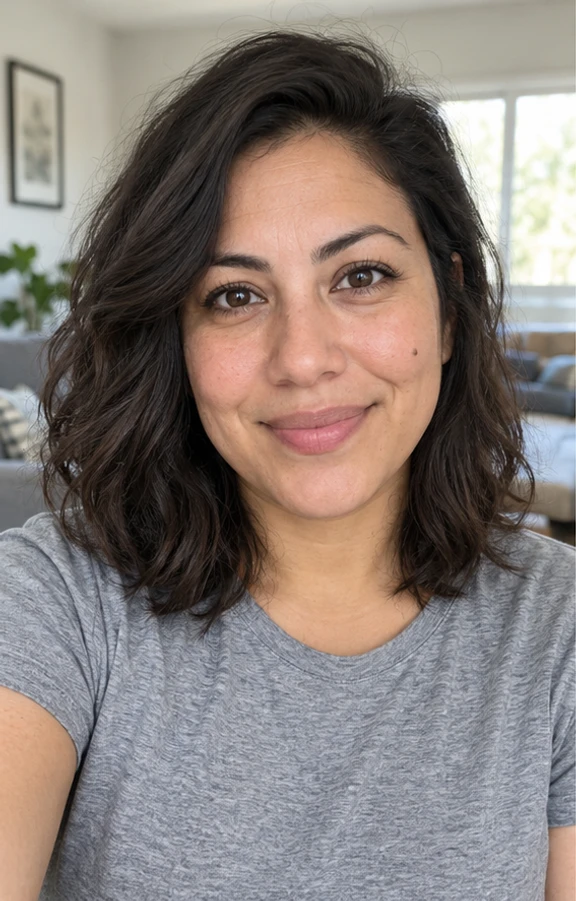
| ① Frontal, eye-level, even lighting | Establishes the facial baseline: eye spacing, nose width, face proportions | Required |
| ② Slight 30–45 degree turn | Adds depth cues: jawline, nose bridge height | Recommended |
| ③ Frontal shot in different light/setting | Helps the model separate "your face" from "ambient light" | Optional |
You can start with just 1 photo, but a clear frontal shot is the baseline — one blurry profile photo is worth less than one sharp frontal photo.
Dimension 2: lighting — the model mistakes color casts for you
Backlight, dim rooms and harsh shadows all force the model to "guess" your face, and everything it guesses is likeness you lose. The sneakier problem is color temperature: shoot a batch under warm yellow lamps and every generated image carries a warm yellow filter — the model cannot tell "your skin tone" apart from "that lamp".
- Best — diffused natural light from a window (overcast window light is the most even of all).
- Fine — bright indoor ceiling light, as long as no large shadows fall across the face.
- Avoid — backlight (underexposed face), dim bar lighting, heavy warm yellow lamps, direct flash (shine + red eye).
Dimension 3: expression and occlusion — keep things off your face
Anything covering the face is a direct tax on likeness: sunglasses make the model guess your eyes, a mask makes it guess the lower half, a hat changes the face shape it perceives. Exaggerated expressions work the same way — upload 20 laughing photos and every generated image laughs, and laughing teeth happen to be a common artifact zone (see the artifact checklist).
| Keep out of your uploads | Why |
|---|---|
| Sunglasses, tinted lenses | The model cannot see the eyes and has to guess |
| Masks, high collars over the chin | Lower face missing, jawline guessed |
| Hats, bangs over the forehead | Changes perceived face shape, distorts the hairline |
| Group photos | The model may learn someone else's features |
| Heavy beauty filters | The filter gets learned as your actual skin |
| Photos from five years ago | You get a five-years-ago version of you |
If you wear glasses every day, keep them on in the reference photos — otherwise the glasses in the results are shaped by the model's imagination.
Dimension 4: clothing and framing — give the model a good start
Even though the generated outfit can be swapped entirely (AIHeadshotNow offers 77 outfits), the clothes in your uploads still shape how the model reads the "collar area": photos in collared tops produce noticeably steadier collar detail. For framing, chest-up with the face dominating the frame is enough — arms do not need to be in the shot.
The 30-second pre-upload checklist
- SharpFacial features stay defined when you zoom in; no mushy focus. Photos from the last two years of phones pass easily.
- Frontal firstAt least one frontal, eye-level shot; add a slightly turned one if you can.
- Even lightLight on the face, no large shadow blocks, no yellow color cast.
- One person, nothing coveringOnly you — no sunglasses, masks or hats, no beauty filter.
- RecentHair and glasses match how you look right now.
Formats and counts: the exact requirements
| Item | AIHeadshotNow's requirement |
|---|---|
| Number of uploads | 1–3 photos (reference-based generation — no need to gather 10–20) |
| Formats | JPG / PNG / WebP |
| Max size per photo | ≤10MB |
| Generation speed | ~3 minutes |
| Free trial | 3 free 4K photos, no card required |
| Credit validity | 365 days (they don't expire — still usable after a haircut) |
Figures per the specs published on aiheadshotnow.com in November 2026.
"Just 1–3 photos" is a product difference, not a product compromise. Training-based tools ask for 10–20 photos because they build a model from scratch; reference-based generation steers an existing capability, swapping the user's burden from "gather volume" to "pick quality". For the majority who hate taking selfies, that removes a major hurdle from the process.
Frequently asked questions
Is a phone front camera good enough?
Yes. Recent front cameras are fully sharp enough. Three things matter: face a window, wipe the lens, skip the beauty mode. The rear camera has better image quality but framing is awkward — the front camera is the practical choice.
What happens to the photos I upload?
At AIHeadshotNow, reference photos are briefly encrypted on the server and used only to complete your linked generation task, then **deleted as soon as processing finishes**; generated photos are kept 15 days and can be deleted earlier at any time; **they are never used to train models**. Full terms are in the privacy policy. This is the most-asked question of the whole upload step — a face is biometric data, and the handling policy deserves a read before you start.
Will uploading just 1 photo hurt the result a lot?
It has some effect, but less than you'd think. One clear frontal photo produces a passing result; 2–3 photos covering different angles and lighting improve depth and consistency. The baseline is "clear + frontal", which matters far more than the count.
Do ID-photo-style frontal shots work as references?
They work as that one "frontal baseline", but ID photos tend to have stiff expressions and flat light, so pairing one with a natural-expression photo works better. The expression in your references carries into the results — if you want a warm, approachable headshot, feed it a natural face.
The result doesn't look like me — change photos or change tools first?
Change photos first. Community testing is remarkably consistent: nine out of ten likeness problems sit on the input side. Retry with sharper frontal photos, no occlusion and no filters, and only consider switching tools if you're still unsatisfied — it helps to run through [why AI headshots don't look like you](/blog/why-ai-headshots-dont-look-like-you) item by item.
Bottom line: 10 minutes of preparing uploads decides 70% of the final result. Multiple angles, good light, nothing covering the face, no filters — two minutes per dimension beats any tool-level trick. Once your photos are ready, upload 1–3 at AIHeadshotNow and see your own face on 4K finished headshots in ~3 minutes — the first 3 are free.
Upload 1–3 reference photos and get 4K professional headshots in about 3 minutes. First 3 free, no card required.
Upload photos and start generating