
Why AI Headshots Don't Look Like You: 6 Causes and the Fix for Each
A photo that is prettier than you but doesn't look like you is the only real failure in headshots — because the next person who meets you in person will always compare.
The short answer
"My AI headshots don't look like me" is the single most frequent complaint in community feedback, and it isn't close. In real-world discussions across r/resumes, r/careerguidance and other communities on Reddit in 2026, the most typical report reads: you upload your own selfies and receive "a stranger who looks like your cousin, only better lit." But this is not an unsolvable curse — lost likeness has identifiable causes, every cause has a matching fix, and most of the fixes are finished before you upload anything.
This article splits the problem into 6 causes and gives a fix for each. If you'd rather compare tools first, start with our 2026 comparison of AI headshot generators.
Cause 1: too few photos, too alike
A model can only learn from the information you hand it. If all 10 photos you upload are the same angle, the same day, the same light, what the model learns is "that angle on that day" — not a complete face. That's why some people receive a whole set of minor variations on one expression, a phenomenon the community calls "same-face syndrome": 40 photos that are really 40 variations of one photo.
- One angle — if everything is a 45-degree selfie, the model has never seen your front or your profile.
- One light — if everything is shot in a bathroom mirror, the model treats that color cast as part of you.
- One expression — 20 photos all grinning means every generated photo grins.
- One time period — if everything is three years old, you get generated as you were three years ago.
The fix: vary the angle, light, expression and time. AIHeadshotNow asks for only 1–3 reference photos, which puts the selection pressure on "pick the best" instead of "scrape together enough" — one clear front-facing shot, one slightly turned, one in different light beats 20 identical selfies. For how to choose, see our photo preparation guide.
Cause 2: the model pulls your face toward an "average attractive face"
General-purpose image models have seen a vast amount of "standard beautiful face" in training, and at generation time they quietly pull your features toward that average: the nose gets "standard", the jawline gets smooth, asymmetries get sanded flat. The more distinctive your features, the more gets averaged away. This isn't one product's bug — it's how this class of model works, and products differ only in how hard they constrain the model with your reference photos.
Concretely, here is the most common "averaged away" checklist — go through it against a real photo before you publish:
| Feature | Typical sign of "averaging" | What to check |
|---|---|---|
| Nose | Narrower, straighter, tip shape changed | Compare nose width and tip outline against a front-facing photo |
| Jawline | Overly smooth, jaw angle gone | Compare the jaw angle against a profile photo |
| Eyes | Spacing, size or eyelid shape changed | Compare eye spacing and eye shape against a front-facing photo |
| Mouth | Lips thinner/fuller, smile arc standardized | Compare the corners of the smile against a real smile photo |
| Facial asymmetry | Moles, freckles or a one-sided dimple erased | Zoom to 100% and confirm signature features survived |
How to check: put the generated image and a recent unfiltered photo side by side, zoom to 100%, and compare item by item.
The fix: this one is solved at the product-selection stage. Verify on your own face with the free tier first — AIHeadshotNow gives 3 free 4K images with no card required, so likeness can be confirmed before any payment. The recurring community pattern: paid tools produce images most people can't tell from real photos, free tools still look obviously fake — and the difference lies mainly in this constraining force.
Cause 3: over-smoothing erases your skin texture
Plastic skin is the second-biggest complaint source. Once pores, fine lines and freckles are uniformly sanded away, the whole face looks waxed — the community ranks this as the #1 visual giveaway of an AI portrait. Smoothing deals likeness a double blow: it makes the photo look fake, and it precisely erases the skin details that let people who know you recognize you instantly.
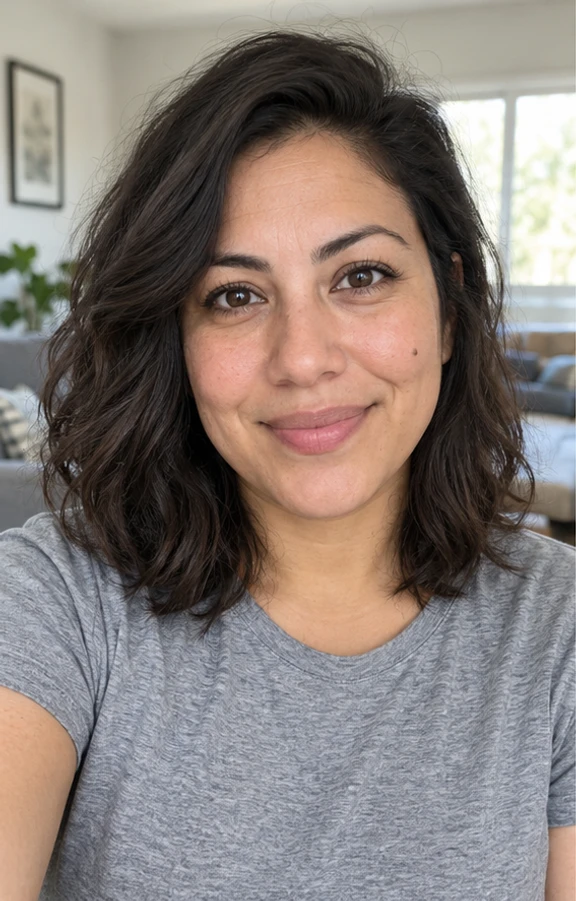
The fix: three steps. ① Don't upload filtered photos — the model learns the filter along with your face; ② from the same batch of results, pick the least-smoothed image, not the most "perfect" one; ③ zoom to 100% and check whether pores and texture are still there. AIHeadshotNow's generation targets explicitly include "natural skin texture, avoid over-smoothing", and you can verify that in the 3 free trial images.
Cause 4: age drift — 5 years older or younger out of nowhere
Age drift is a problem the community names again and again: models drift toward the "average age of a professional headshot" in their training data, so a 30-year-old receives results that look 40 — or the reverse. When you sit down for the interview in person, the gap between photo and person instantly becomes a small but real trust crack.
| Drift type | Typical sign | What to do |
|---|---|---|
| Looks older | Smile lines and forehead lines deepened out of nowhere | Regenerate with more recent photos; check that hair volume and color weren't changed |
| Looks younger | Face over-smoothed, contours rounded off | Check whether skin texture was erased (see the previous section) |
| Hairstyle / hair color change | Long hair cut short, dark hair lightened | Keep your current hairstyle in the reference photos; long-haired users should check this first |
In community feedback, "long-haired woman turned into a bob" is a high-frequency complaint — long-haired users should make hairstyle the top priority to check.
Cause 5: checking the images at thumbnail size
Many people glance at the image at avatar size (about 100–200px), ship it, and only discover the broken details when a colleague zooms in. The reverse holds too: at small sizes almost every flaw disappears; at 100% zoom no flaw can hide. The right habit is to look at both sizes, and the deciding size should be the one you'll actually publish at.
- Pre-publish checklist — eye reflections point the same way, teeth are normal in number and shape, both ears match, hair strands don't melt into the background, glasses frames aren't warped, the collar is symmetrical.
- Remedy after publishing — AIHeadshotNow keeps finished images in "My Photos" for 15 days; you can delete or regenerate earlier at any time, and failed generations refund their credits.
The complete artifact checklist (a 7-area, item-by-item table) is in this article — run your results through it once, 60 seconds is enough.
Cause 6: skipping the "who is this?" test
The last cause is psychological: the final judge of likeness isn't you in the mirror, it's the people who have met you. Psychologically, your self-image is built from years of seeing a moving face, so even a technically accurate photo can feel "off" to you — that's the frozen face effect. So don't agonize alone over the photo; run the practical test that circulates widely in the community:
- Send it to a friendSend one generated headshot to someone who knows you, with no explanation attached.
- Ask one questionOnly ask: who is this?
- Watch the reaction speedInstant answer with your name — pass; hesitation or "is that you?" — redo.
- If it fails, change the input and rerun90% of likeness problems live in the uploaded photos. Rerun with a better set of references instead of endlessly tweaking prompts.
One table: cause → fix → who owns it
| Cause | Fix | Possible before upload? |
|---|---|---|
| Too few photos, too alike | 1–3 curated shots: multiple angles, lights, expressions | Yes — the highest-impact step |
| Features averaged away | Try 3 free images first, verify likeness yourself, then pay | Yes — solved at product selection |
| Over-smoothing | Upload unfiltered originals; pick the least-smoothed result | Yes — on the upload side |
| Age drift | Use recent photos; check hairstyle and lines first | Yes |
| Thumbnail-size approval | 100% zoom check + a recheck at your real publishing size | After generation |
| Frozen face effect | The "who is this?" friend test | After generation |
The first three rows happen before you press the generate button — which is why "choosing the right photos" carries more weight than "choosing the right tool".
Frequently asked questions
Can AI headshots actually look like me?
Yes, with conditions. The 2026 Reddit consensus: with qualified input photos, most people can no longer tell paid tools' output from real photos; free tools still generally look fake at a glance. The key variables are the quality of your uploaded photos and how strongly the tool constrains your identity features. Verify on your own face with the free tier first — AIHeadshotNow gives 3 free 4K images, no card required.
Only a few images in a 40-photo set are usable — is that normal?
Yes, it's the industry's current state, not an outlier. Typical community hit rates: 20–40% clearly usable, 40–50% acceptable but not ideal, 10–20% with visible flaws. So price tools by "usable images", not total images — we wrote a whole [keeper-rate analysis](/blog/ai-headshot-keeper-rate) on how to run that math.
How many photos should I upload for the best result?
It depends on the tool: training-based tools want 10–20 photos, reference-image tools need only 1–3. The count has never been the deciding factor — diversity and sharpness are: different angles, different light, recent, no filter, you alone in frame. AIHeadshotNow works from 1–3 reference photos and spends its effort on selection rather than volume.
The generated photos erased my mole/freckles — what do I do?
That's over-smoothing, one of the most common likeness killers. Two moves: upload photos in their natural state without beauty filters, and pick the result that keeps skin texture. If an entire batch came back smoothed flat, the tool's constraint is too weak — switching tools beats retrying forever.
Why do I never think photos of me look like me?
It may not be the photo. Your self-image is built on years of seeing your face in motion, so static photos naturally feel strange (the frozen face effect). That's why the final judgment should come from people who know you: send the photo to a friend, ask "who is this", and an instant answer with your name means the likeness passes.
To compress it into one sentence: lost likeness isn't magic — it's six named causes with known fixes. Three of them happen before you upload: your photos' variety, sharpness and authenticity, a half that's entirely in your hands; the other half is the tool's identity-preservation ability, and that half can be verified with 3 free images. AIHeadshotNow pushes the cost of verification to zero: upload 1–3 photos, about 3 minutes, and decide with your own eyes whether it looks like you before paying anything.
Upload 1–3 photos and get 3 free 4K headshots in about 3 minutes. Whether it looks like you is settled before you pay.
Generate 3 free headshots