
What to Wear for a Professional Headshot: The 2026 Industry Cheat Sheet
Wardrobe and background share exactly one job: keep the viewer's attention on your face. Anything that steals the scene is wrong.
The three ground rules
Boil down the consensus across 2026 professional photography guides and the wardrobe-and-background decision rests on just three rules — everything else is execution detail:
- Solid colours first — patterns, stripes and large logos all magnify into noise on camera, especially fine stripes (moiré warning).
- Clear contrast — there must be a brightness gap between clothes and background: no white shirt on a white backdrop, no pure black on a dark one.
- Look like the role you're aiming for — dress at the level you would wear on your first day in that job, not at the most formal thing in your closet.
What to wear, by industry
| Industry | Recommended wardrobe | Avoid |
|---|---|---|
| Finance / law / consulting | Dark suit (navy, charcoal) + tie or blazer | Casual knits, denim |
| Tech | Shirt or crew-neck knit, polo — no tie needed | An overly formal three-piece |
| Healthcare | White coat or a clean shirt | Flashy accessories |
| Real estate / sales | Blazer + an approachable colour underneath | All black (too distant) |
| Creative / content | Textured casual wear; colour can carry personality | Too casual (T-shirt and flip-flops) |
| Education / public sector | Shirt, knitwear, steady solid colours | Statement cuts |
When in doubt, apply the 'half-step up' rule: dress half a level more formal than your everyday wear. This matches the advice across multiple 2026 professional photography guides.
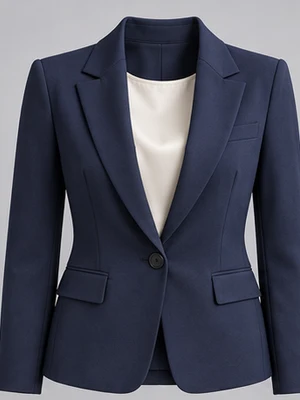
Choosing the colour, close up
The same blazer signals different things in different colours. Below is the colour-to-signal mapping that keeps reappearing in community threads and photography guides:
| Colour | The signal it sends | Who it suits |
|---|---|---|
| Navy / charcoal | Reliable, professional, steady | The default safe bet in almost every industry |
| White / light layers | Clean, approachable | Education, healthcare, service roles (mind the brightness gap against the background) |
| Burgundy / forest green | Confident, memorable | Speakers, founders, personal brands |
| All black | Authoritative but distant | Executive portraits (needs a bright background) |
| Pastels | Young, friendly | Content creators, lifestyle industries |
Skin-tone fit beats colour semantics: jewel tones (navy, deep green, burgundy) perform steadily on most skin tones.
Backgrounds, by industry
There is only one test for a background: if your eyes drift to it, it is too busy. LinkedIn's 2026 profile-photo rules do not mandate a background colour, but the industry's safe bets are remarkably consistent.
| Background | Look and feel | AIHeadshotNow equivalent |
|---|---|---|
| Mid-grey / charcoal studio | The most reliable across all industries; flatters any skin tone and outfit | Charcoal studio, studio grey, mid-grey solid |
| Pure white / light | Clean, official; common for healthcare and ID-style shots | Studio white, ivory white, pure white |
| Deep blue / dark | Strong sense of authority; favoured by executives and lawyers | Deep navy studio, charcoal black |
| Blurred office | Professional context; common in tech and consulting | Bright office, open workspace |
| Blurred outdoor | Lived-in feel; a plus for real estate and creative work | City terrace, red-brick loft, garden, library |
AIHeadshotNow's background library holds 41 backgrounds, split evenly between studio solids and blurred real-world scenes — how to combine them is in the cheat sheet below.
Classic combos: copy these
Wardrobe and background multiply each other: good pairings lift one another, bad ones cancel each other out. Three classic pairings you can use as-is:

- Formal tier — dark suit × mid-grey or pure-white studio: finance, law, job applications.
- Approachable tier — collared shirt or knit × blurred office: tech, education, team pages.
- Memorable tier — burgundy / deep-green top × deep-blue studio: speaker pages, founder intros, personal brands.
In a traditional shoot, 'trying a few outfits' means paying extra for retouching — or having no choice at all. In a generator it is a free action: AIHeadshotNow offers 77 outfits × 41 backgrounds, and the same set of reference photos can produce formal, approachable, dark and light versions alike — one of the items we tallied in detail in AIHeadshotNow vs. a photographer.
Three frequent wardrobe mistakes
| The mistake | Why it fails | Do this instead |
|---|---|---|
| White top on a white background | Clothes and background blur into one; your silhouette disappears | Change the background or the outfit; keep a brightness gap |
| Brand-new, never-worn clothes | An ill-fitting collar and shoulder seam have nowhere to hide on camera | Wear something worn-in whose on-camera behaviour you know |
| An overworked full look | Accessories and patterns drag the eye away from your face | Subtract; the face is the only protagonist |
Frequently asked questions
Do I need to prepare a suit for AI headshots?
No. Your uploaded reference photos only need a clear face; wardrobe and background are chosen freely at generation time — AIHeadshotNow has 77 outfits and 41 backgrounds on the menu, from formal suits to casual knits. It is the studio's wardrobe room, moved into the generation flow.
Does LinkedIn have hard photo requirements?
LinkedIn recommends at least 400×400 pixels (officially 800×800 or larger), files under 8MB, a square crop displayed as a circle, with the face filling roughly 60–70% of the frame height. AIHeadshotNow outputs 4K (3840×2160) — far above the bar — and lets you choose the aspect ratio at generation.
Blurred real scene or studio solid?
Depends on the use: company pages, resumes and ID-style contexts take studio solids (grey, white and deep blue are safest); personal sites and real-estate or creative LinkedIn profiles can use a blurred office or outdoor scene for context. When unsure, pick the mid-grey studio — it flatters everyone.
Can one photo set generate different outfits?
Yes — and it is one of the core advantages of generation. The same reference photos can produce multiple wardrobe-and-background combinations for different occasions: formal for client pitches, approachable for your own site, dark for speaker posters. Multiple combinations consume credits per image — Basic 30, Standard 50, Pro 90 — and credits stay valid for 365 days.
What should glasses wearers watch out for?
If you wear glasses daily, keep them in the reference photos — the model learns the frame's shape and position; when reviewing results, check whether the frames warped and whether the reflection angles make sense (see our artifact checklist). If you only wear contacts occasionally, generating a no-glasses version is even more freeing.
In one sentence: there is no 'most fashionable' answer for wardrobe and background, only the 'least distracting' one. Solids, good fit, a brightness gap against the background, then half a step up for your industry — and you cannot go wrong. As for the cost of trial and error — AIHeadshotNow turns 'try another one' into two clicks with 77 outfits × 41 backgrounds. Start with 3 free images, test the safest combination, and scale up once you are satisfied.
Upload 1–3 photos, mix and match wardrobe and background freely, and get 4K professional headshots in about 3 minutes. The first 3 are free.
Try 3 free headshots