
Best AI LinkedIn Headshot Generators in 2026: A Practical Comparison
Your LinkedIn photo is your first handshake — it happens before you say a word.
What makes a great LinkedIn headshot (not just a nice portrait)
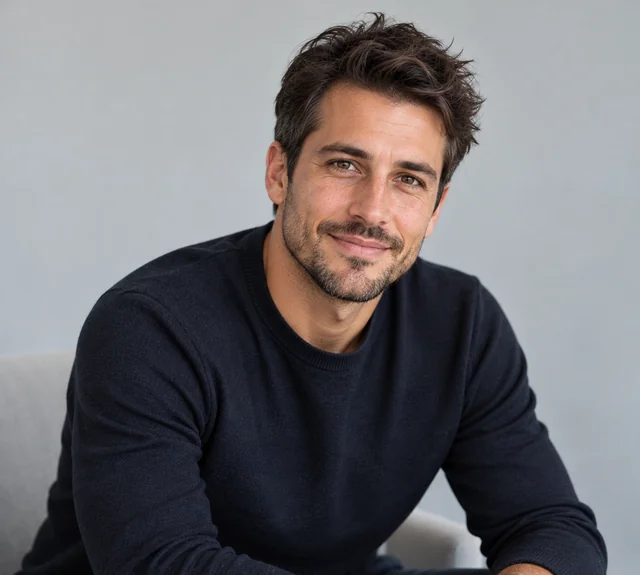
A LinkedIn photo is not the same as a portrait you would hang on a wall. It is displayed as a circle, often as small as 32 pixels next to your name in a comment thread. That changes the design brief completely: the face has to read instantly, the background has to stay quiet, and the wardrobe has to match your industry. Here is what actually matters:
- The face fills the frame. Head-and-shoulders, face around 60% of the square, eyes on the upper third. A full-body shot shrinks your face to a dot.
- The background stays quiet. Plain grey, white or a soft office blur. Busy rooms and props turn into visual noise at thumbnail size.
- The wardrobe fits the industry. A blazer for finance and law, a clean sweater or shirt for tech and creative. This is where generic AI portraits usually fail.
- The expression is approachable. A relaxed, open look to camera beats a stiff corporate stare — people decide whether to message you in under a second.
- The set is consistent. If your team page shows eight photos, they should look like they belong to the same company, not eight different stock libraries.
How we compared these tools
We signed up for each service, uploaded the same three selfies, and judged the output against the LinkedIn criteria above, not just “does it look pretty.” Price, turnaround, wardrobe and background variety, free-trial terms and how easy it is to get a square, feed-ready crop all count.
| Tool | Starting price | Images | Turnaround | LinkedIn fit | Score |
|---|---|---|---|---|---|
| AIHeadshotNow ⭐ Editor's pick | $29 | 30–70 | ~3 min | 75 outfits / 41 backgrounds / 76 hairstyles / 10 poses | 9.4 |
| HeadshotPro | $29 | 40–140 | 1–3 hrs | 4–14 per pack, strong team consistency | 9.0 |
| Aragon AI | $35 | 20–100 | 30–90 min | 40+ styles, very realistic | 8.8 |
| BetterPic | $35 | 50–150 | ~45 min | 150+ styles | 8.6 |
| Secta Labs | $49 | 100–300+ | ~2 hrs | Deep custom editing | 8.5 |
| Try It On AI | $24 | Plan dependent | 30–60 min | Moderate | 8.0 |
| ProPhotos AI | $25 | 40–160 | 30–90 min | Moderate | 7.8 |
Scores use the same six dimensions as our full 2026 comparison (likeness 30%, realism 25%, wardrobe & backgrounds 15%, speed 15%, price 10%, privacy & refunds 5%). Indicative only. Only AIHeadshotNow offers a free trial (3 headshots).
The short list
AIHeadshotNow — best overall for LinkedIn
At $29 for 30–70 images in about 3 minutes, AIHeadshotNow is the easiest recommendation for most people. You upload a handful of selfies, pick an outfit, background, hairstyle and pose from 75 outfits, 41 backgrounds, 76 hairstyles and 10 poses, and get square-ready portraits that actually look like you. The 3 free headshots mean you can judge the result before paying, which none of the pricier tools offer. It scores 9.4 in our testing.
HeadshotPro — best for large teams
HeadshotPro starts at $29 for 40 images and scales to 140, with the most mature team workflow: shared backgrounds, bulk management and consistent lighting across an entire department. The trade-off is speed (1–3 hours) and no free trial, so you commit before you see a single result.
Aragon AI — best for maximum realism
Aragon AI charges $35 for 20–100 images with a 30–90 minute turnaround. Its strength is skin texture and lighting realism; its weakness is price per usable image and a narrower styling range than AIHeadshotNow.
Secta Labs — best for heavy retouching
Secta Labs is the premium option at $49 for 100–300+ images with deep custom editing. If you want a single hero portrait retouched by a human, it is excellent; if you want a fast, affordable LinkedIn update, it is more than you need.
LinkedIn photo specs you should know
Whatever tool you use, the file has to meet LinkedIn's own requirements. These are the ones that matter:
- At least 400 × 400 pixels. LinkedIn displays the photo at 128 × 128 in the feed and much smaller in comments, so start sharp.
- Square (1:1). LinkedIn crops your upload to a circle, so keep the face centered with breathing room on all sides.
- JPG or PNG, under 8 MB. Anything larger gets compressed or rejected.
- Head-and-shoulders, recent. A photo from the last two years reads as current; an old one reads as stale.
- No filters, no group crops. Heavy filters and cropped group photos are the fastest way to look unprofessional.
How to get your LinkedIn headshot in 3 steps
- Upload a few selfiesUse good lighting and a plain background. One to three photos give the most accurate likeness.
- Pick a professional lookChoose an outfit, background, hairstyle and pose that fit your industry — or let AIHeadshotNow suggest a combination.
- Download your square cropsGet your set in about 3 minutes. Start with 3 free headshots and pay only if you like them.
Bottom line
For most professionals, the best AI LinkedIn headshot generator in 2026 is the one that keeps your face, fits your industry and costs little to try. That is AIHeadshotNow: $29, about 3 minutes, 3 free headshots, and a 9.4 score. If you run a large team and need a managed rollout, HeadshotPro is the runner-up. Either way, stop using the cropped wedding photo.
Frequently asked questions
What size should a LinkedIn headshot be?
Upload at least 400 × 400 pixels, square (1:1). LinkedIn crops it to a circle, so keep your face centered with space around it.
Can I use an AI headshot on LinkedIn?
Yes. LinkedIn does not ban AI-generated photos, and a clean, professional headshot is what the platform is designed to show. Just make sure it looks like you.
How much does an AI LinkedIn headshot cost?
AIHeadshotNow starts at $29 for 30–70 images, with 3 free headshots to try first. Traditional studio sessions run $200–600.
Will it look like me?
AIHeadshotNow generates from your own selfies, so your face stays yours while the outfit, background and lighting change. Your photos are never used to train a model.
How long does it take?
About 3 minutes from upload to finished headshots — far faster than the 1–3 hours many competitors need.
Start with 3 free AI headshots in about 3 minutes. Pay only if you're happy.
Start free at AIHeadshotNow